Alarm Clock: Alarm App & Sleep
RevokeProductivity
4.268.00 Reviews
- Version
- 1.25.1
- Installs
- 500.00K
- Age Rating
- Everyone
Screenshots
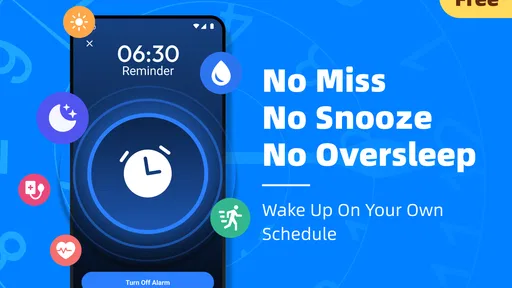
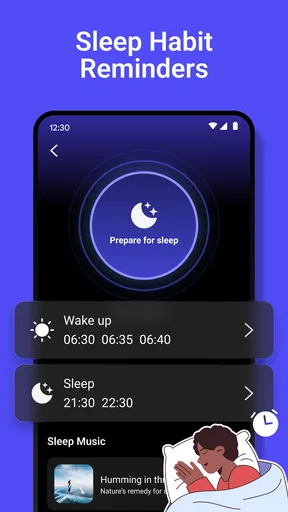
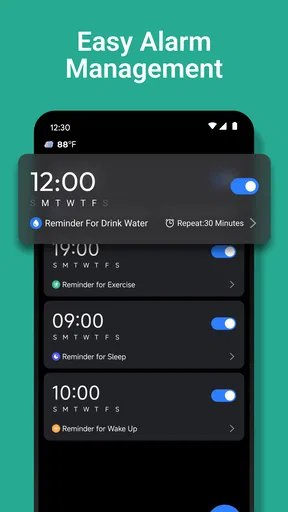
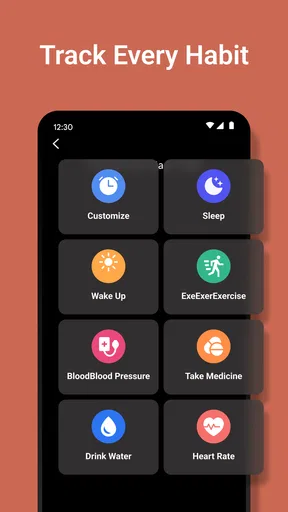
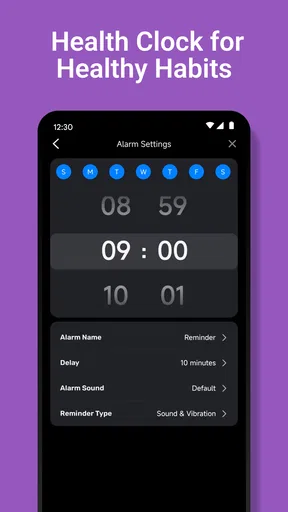

Our Review of Alarm Clock: Alarm App & Sleep
 Analysis by Appyee
I tested Alarm Clock: Alarm App & Sleep as a practical tool rather than treating it like just another clock on a phone. That distinction matters because waking up reliably is rarely solved by a louder sound alone. The useful question is whether an alarm can fit into a repeatable evening and morning routine without creating new friction. In my experience, this app is most interesting for people who sleep through ordinary alerts and want a more deliberate way to protect their first important task of the day.
It is a free productivity app from Revoke, available for everyone and compatible with Android 8.0 or later. The current version is 1.25.1, and it has passed the half-million-install mark with a 4.2 average from roughly nine hundred ratings. Those figures suggest a healthy level of real-world use, but they do not replace the more important test: whether its approach matches the way you actually sleep, wake, and plan your mornings.
How I fit the alarm into a sustainable morning system
I treat the alarm as one part of a morning system, not as a fix for every rough start. My next step is to make the routine sustainable: choose a wake time I can keep, prepare one simple first action, and use the evening reminder to begin winding down before I am exhausted. That makes it easier to judge whether the setup is helping, and it leads naturally to the small adjustments that keep it workable over time.
Start with the problem before setting another alarm
Before using it, I looked at the point where my usual routine failed. A standard phone alarm was fine on nights when I went to bed on time, but it was easy to dismiss when I was exhausted, and a single generic tone quickly became background noise. That made the morning problem partly an evening problem. If I kept changing alarms without changing the routine around them, I was only moving buttons around on the screen.
Alarm Clock: Alarm App & Sleep is built around the needs of people who are difficult to wake, so I approached it as a stronger boundary between sleep and the first commitment of the day. The app’s loud alarm focus is useful, but I would not treat volume as a complete sleep strategy. A dependable setup still begins with choosing a realistic bedtime, allowing enough time for sleep, and deciding what the alarm is meant to protect: work, school, travel, exercise, medication, or simply a calmer start.
That framing also helps avoid a common mistake. Some people create several alarms at random intervals, then learn to ignore all of them. I found it more sensible to use a primary wake-up point and make any repeat behavior part of a plan rather than a series of desperate postponements. The app gives that approach room through repeat settings and custom tones, but the discipline still comes from the person using it.
Capture the right schedule instead of relying on memory
The practical advantage of a dedicated alarm app is that I can move a recurring obligation out of my head. Rather than remembering which mornings require an earlier start, I can create a schedule that reflects the week. This is especially helpful when weekdays, weekends, and occasional commitments do not follow the same pattern.
I recommend setting the alarm while planning the next day, not while already half asleep. That small timing change reduces errors such as selecting the wrong day or forgetting that a special appointment needs a different wake-up time. It also turns the alarm into the final step of an evening shutdown routine: check tomorrow’s first task, choose the wake time, confirm the sound, and put the phone where it can be heard.
The repeat capability is valuable here because it supports a routine that can survive ordinary weeks. A person with a fixed work schedule does not need to rebuild the same alarm each night. Someone with rotating commitments can use a more selective pattern instead of assuming that one schedule fits every day. I would still review recurring alarms whenever a timetable changes, because automation is only helpful while the underlying schedule remains true.
Custom tones have a less obvious benefit than simple personalization. A familiar sound can become easy to dismiss, while a distinctive tone can create a clearer break from sleep. I would choose something noticeable but not so unpleasant that it makes waking feel like punishment. If another person shares the room, this is also where the app may be less suitable: a stronger alarm can solve one sleeper’s problem while creating a new one for everyone nearby.
Build a repeatable routine around the wake-up moment
The alarm should not be the entire morning plan. I had better results when I decided in advance what would happen immediately after turning it off. For example, the first action might be sitting up, switching on a light, drinking water, or walking to a prepared workspace. The specific action matters less than removing the decision from the sleepy part of the morning.
This is where sleep reminders can support the broader workflow. A reminder to prepare for sleep is more useful than another alert after the night has already run late. I see it as a prompt to begin reducing activity, finish essential tasks, and stop negotiating with myself about “just a few more minutes.” The reminder cannot force a healthy bedtime, but it can make the transition visible enough to become habitual.
One of my favorite ways to use this kind of setup is to connect the evening reminder with the next morning’s purpose. If I need to leave early, I prepare clothes and essentials before bed, then set the alarm only after checking that everything is ready. That makes the morning alarm a trigger for an existing plan rather than a lonely command to wake up and improvise.
For heavy sleepers, I would also test the arrangement on a normal day before trusting it for something important. Check that the chosen tone is audible from the intended location, that the repeat pattern behaves as expected, and that the phone is not buried under bedding or placed somewhere that muffles it. This is a concrete but easily overlooked trade-off: putting the phone farther away may encourage movement, while placing it too far away can make the sound ineffective.
Another useful habit is to avoid making every day an emergency wake-up. If I use the loudest possible approach for routine mornings, I may become irritated by it or start dismissing it automatically. I would reserve the most forceful combination of tone and repetition for days when waking is genuinely difficult, while keeping ordinary alarms noticeable but manageable. That gives the system contrast and helps preserve attention.
Where the setup can fail
No alarm app can guarantee that a person will wake up. The most obvious failure point is sleep debt. If I regularly go to bed too late, a loud alert may get me upright once, but it will not repair the underlying pattern. In that situation, the app is best used alongside a consistent evening cutoff, not as permission to keep borrowing sleep from tomorrow.
Another weakness is dependence on the phone’s practical condition. A low battery, muted device, inconvenient placement, or a changed system setting can undermine even a carefully planned alarm. I make a habit of checking the device before bed, especially when the next morning has consequences. This is not a criticism unique to Revoke; it is the unavoidable cost of using a phone as the alarm clock instead of a separate bedside device.
Repeat alarms also need restraint. They can help someone transition gradually into the day, but repeated postponement can become a learned response. If I notice that I am dismissing several alerts without becoming more awake, I would simplify the schedule and change the first action after waking. More alerts are not automatically more reliable.
Custom tones can fail in a different way. A sound that feels effective at first may lose its impact through repetition, while a tone that is too aggressive may make the user reach for the phone purely to silence it. I would rotate tones only when there is a clear reason, rather than constantly changing settings. The goal is recognition and action, not novelty.
There is also a social limitation. A heavy sleeper who shares a bedroom may need a solution that wakes one person without disturbing another. A loud phone alarm is not ideal for that situation, particularly when the other person has an early or different schedule. A wearable or a dedicated alarm designed for individual feedback may be a better choice, even if it means using a separate product.
How it compares with a phone’s standard clock
The default clock app remains the simplest option for many people. It is usually quick to open, familiar, and sufficient for a single occasional alarm. If I wake easily and my schedule changes constantly, the extra focus on loud alarms, reminders, repeats, and tones may not justify adding another app to my routine.
Alarm Clock: Alarm App & Sleep makes more sense when the standard alarm has already failed in a repeatable way. Its value is not merely that it displays a time; it encourages me to think about the wake-up schedule, the sound, and the evening reminder as connected pieces. That is a better fit for a person who needs structure around waking rather than a person who only needs a quick timer.
It also occupies a middle ground between a basic clock and more elaborate sleep platforms. A full sleep-tracking service may offer broader analysis and health-oriented insights, but that can be unnecessary if the immediate problem is simply missing the alarm. On the other hand, someone who wants detailed sleep trends, wearable integration, or a gentle wake window may prefer a more specialized option. I would choose this app for directness, not for an extensive sleep science dashboard.
Compared with a separate physical alarm clock, the phone-based approach is convenient and easy to adjust. The drawback is that the phone is also a source of messages, videos, and late-night distractions. If I keep it beside the pillow, the same device that helps me wake can encourage me to stay engaged before sleep. Using the app well therefore requires a boundary: set the alarm, complete the evening routine, and avoid turning the alarm device into an entertainment device.
Who should make it part of a routine
I think the strongest audience is the person who repeatedly sleeps through ordinary alarms and wants a free, focused solution before investing in specialized hardware. It is also a reasonable fit for people with recurring schedules who want reminders and repeat patterns to reduce nightly setup. Students, shift workers, early commuters, and anyone protecting a morning appointment can all benefit if they are willing to test the arrangement before relying on it.
The app is less convincing for light sleepers who already wake naturally or for users who dislike managing recurring settings. It may also be the wrong choice for people who need quiet, private wake-up feedback in a shared room. Anyone looking for detailed sleep measurement rather than wake-up support should compare it with a sleep-tracking product instead of expecting this app to serve both roles.
Because it is rated for everyone, the interface is approachable for a broad household, but that does not mean every sleeping pattern is equally well served. A child, an older family member, or someone with an irregular schedule may need a carefully tested setup and help with the repeat pattern. I would avoid assuming that installing it solves the problem immediately; the first few mornings should be treated as a trial period.
The developer, Revoke, has kept the product’s identity clear: it is a productivity-oriented alarm rather than a complicated planning suite. That focus is a strength when I want less distraction and a direct path from evening reminder to morning wake-up. It is a limitation when I expect the app to coordinate a complete sleep program or replace changes in bedtime behavior.
My practical verdict after using the workflow
My overall impression is that Alarm Clock: Alarm App & Sleep works best when I treat it as one component of a reliable system. The loud alarm addresses the immediate moment, custom tones help maintain attention, repeats support recurring schedules, and sleep reminders connect the morning problem to the evening routine. None of those pieces is magic on its own, but together they create more structure than the usual one-off alarm.
The most important setup is not the most dramatic one. I would begin with one realistic wake time, a sensible repeat pattern, a tone that is clearly audible, and an evening reminder early enough to change behavior. Then I would test it on an ordinary morning, adjust the phone’s placement, and only add complexity if a real problem remains. That approach is more sustainable than stacking alarms until the phone becomes another source of stress.
For a free productivity app with a broad audience and a clear purpose, it earns a place on my shortlist for heavy sleepers. I would recommend it to a friend who keeps missing important mornings, provided that friend also agrees to improve the bedtime routine surrounding it. The app can make waking more deliberate, but the dependable result comes from pairing its alarm with a routine you can repeat.
Verdict
Strengths of Alarm Clock: Alarm App & Sleep
- Multiple alarm schedules support different routines and wake-up times.
- Gradual volume options can make waking up feel less abrupt.
- Sleep-focused tools may help users build a more consistent bedtime routine.
- Clear alarm controls make it easy to create, edit, or disable alarms.
- Useful for heavy sleepers who need more than a basic phone alarm.
Limitations of Alarm Clock: Alarm App & Sleep
- Some advanced features may require a subscription or in-app purchase.
- Background battery restrictions can affect alarm reliability on some devices.
- Frequent notifications may feel excessive if sleep reminders are enabled.
- The app may need several permissions to provide its full set of features.
- Extra sleep tools can make the interface feel busier than a standard alarm.
Similar Picks in This Category
View All
Google Calendar
Google LLC4.6

Google Drive
Google LLC4.3

Google Assistant
Google LLC3.9

Microsoft OneDrive
Microsoft Corporation4.6

Samsung Calendar
Samsung Electronics Co., Ltd.4.1

Microsoft OneNote: Save Notes
Microsoft Corporation4.6
Frequently Asked Questions
What is Alarm Clock: Alarm App & Sleep?
Alarm Clock: Alarm App & Sleep is a multifunctional alarm and sleep-management app designed to help users wake up on time and build healthier daily routines. Besides standard alarms, it may include features such as customizable sounds, repeat schedules, sleep-related tools, timers, and bedtime reminders. Its usefulness depends on which features are available in the installed version and on your device’s permissions and settings.
Can I customize alarms, sounds, and repeat schedules?
Yes, the app is intended to provide more flexibility than a basic phone alarm. You can generally create separate alarms, choose the time and repeat days, adjust labels, and select from available alarm tones or sounds. Some versions may also support gradually increasing volume, vibration, snooze controls, or personalized wake-up options. Check the alarm settings carefully so your schedule matches your routine.
Will the alarm work if my phone is on silent or Do Not Disturb mode?
Alarm behavior can vary according to your phone model, operating-system version, and notification settings. Many devices allow alarms to sound even when media volume is muted, but Do Not Disturb rules, battery-saving modes, or restricted background activity can interfere. Before relying on the app for an important appointment, test an alarm and grant notification, sound, and background permissions when requested.
Does Alarm Clock: Alarm App & Sleep track sleep or require special permissions?
The app may offer sleep-oriented features such as bedtime reminders, sleep schedules, or basic sleep tracking, depending on the version and platform. More advanced tracking can require access to notifications, motion sensors, health data, microphone features, or background activity. Review the permission requests and privacy information before enabling them, and allow only access that is necessary for the features you actually plan to use.
Is Alarm Clock: Alarm App & Sleep free to download and use?
The app may be available as a free download while offering optional premium features, subscriptions, advertisements, or in-app purchases. Basic alarm functions are often accessible without payment, but advanced sounds, sleep tools, customization, or an ad-free experience may be restricted. Always check the current store listing for pricing, trial terms, renewal conditions, and supported devices before subscribing.
